How TUN Devices Work: Building a Minimal VPN in Go


Overview
This post is the first in a series of blog posts to learn more about Linux kernel networking, this will focus primarily on TUN: https://en.wikipedia.org/wiki/TUN/TAP
Why am I doing this?
This post and the future Linux kernel networking posts are primarily a learning experience for me, but also I want to be able to provide some worked examples explaining different kernel networking concepts and primitives, as clear detailed examples have been somewhat difficult to find.
What is a TUN?
TUN is a network tunnel, which simulates a network layer device, it operates at layer 3, so carries IP packets.
TUN provides packet reception and transmission to userspace programs.
Some examples of applications making use of TUN interfaces is:
How does an application use a TUN interface?
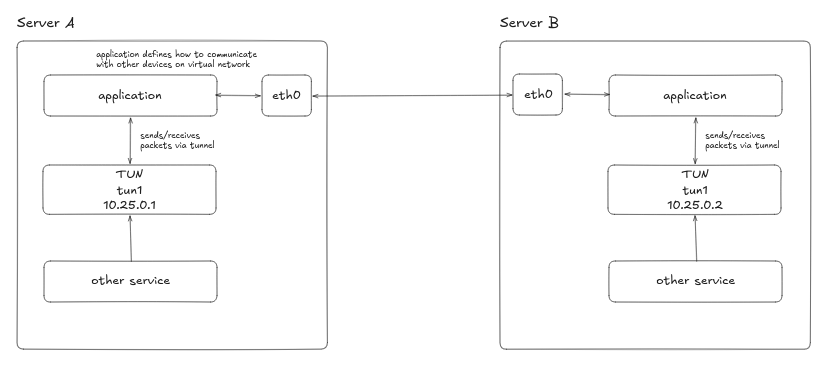
The above diagram is an example of a well used design pattern making use of the TUN interface, in the example, the application takes and sends traffic for 10.25.0.1 or 10.25.0.2 depending on the server, and makes use of eth0 to send the traffic across the network.
Why does it matter?
The TUN primitive matters because it allows a service to decide what to do with traffic being sent to a certain address, this could mean:
- Encrypt each packet with any cryptographic algorithm
- Encapsulate encrypted packets as a simple UDP packet
- Present as a virtual interface so that OS can make use of it simply, making the encryption and other features transparent to other applications
- Simulating network conditions
- Packet capture and injection
How are we going to use it?
We are essentially going to make a simplified application in the exact same shape as the above.
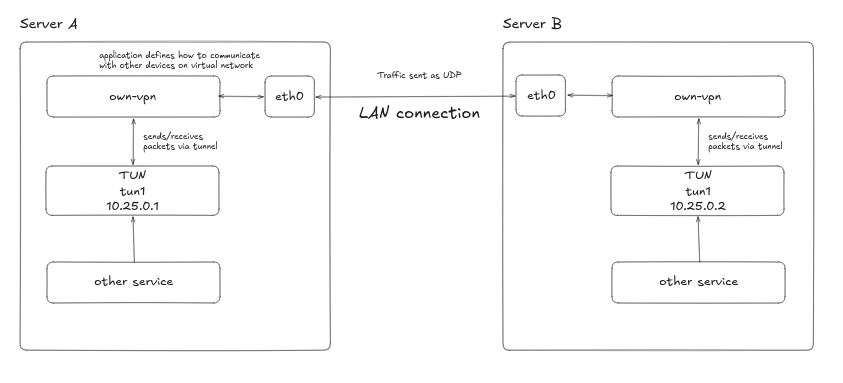
The only difference we are going to have here, is that we will:
- Name our application something simple:
own-vpn - simplify the connection between the servers
- the only thing between the servers will be a switch, and each instance will know the LAN address of the other server on boot (no need to coordinate)
Putting it together
Functionality
Features:
- Create a
TUNwith a range of69.255.0.0/24- Set an IP e.g.
69.255.0.1 - Take packets intended for that range, and send via
UDPto the target*
- Set an IP e.g.
- Listen on
UDP- Receive packets sent via
UDP - Route through the
TUN
- Receive packets sent via
*- We are providing a LAN address mapped to the target 69.255.0.0/24 address, in production this would require some handling of a coordination server
3 arguments:
up- set up theTUNdown- tear down theTUNrun- run the application
Usage
- Set up the
TUNwithownvpn up - Run the application as a daemon
ownvpn run - When done, tear down the
TUNwithownvpn down
Data flow
A full round trip for a packet is as follows
- Machine A (
69.255.0.1) has an application that sends to69.255.0.2, the kernel routes it to theownvpn0interface set for/24 - The
runcommand reads the packet out of theTUNfile descriptor, checks its neighbours mapping, and sends the IP packet for69.255.0.2as a payload via UDP - Machine B (
69.255.0.2) listens on UDP, receives the UDP datagram, parses it as IPv4 and checks for the destination of the inner packet69.255.0.2, which is the address it has assigned at its ownownvpn0interface and therefore writes the inner packet to its ownTUNfile descriptor - The kernel then sees this come in for
69.255.0.2and sends that packet on to the process running at the socket.
Code
Creating the TUN:
// create TUN
	la := netlink.NewLinkAttrs()
	la.Name = "ownvpn0"
	tun := &netlink.Tuntap{
		LinkAttrs: la,
		Mode:      netlink.TUNTAP_MODE_TUN,
		Flags:     netlink.TUNTAP_DEFAULTS | netlink.TUNTAP_NO_PI,
	}

	err := netlink.LinkAdd(tun)
	if err != nil {
		log.Println("error adding TUN: ", err)
		return
	}

	// assign address
	addr, err := netlink.ParseAddr("69.255.0.1/24")
	if err != nil {
		log.Println("error parsing TUN CIDR: ", err)
		return
	}
	err = netlink.AddrAdd(tun, addr)
	if err != nil {
		log.Println("error adding address to TUN: ", err)
		return
	}

	err = netlink.LinkSetUp(tun)
	if err != nil {
		log.Println("error setting TUN to up: ", err)
		return
	}

	// turn off multicast
	err = netlink.LinkSetMulticastOff(tun)
	if err != nil {
		log.Println("error turning multicast off: ", err)
		return
	}
The above snippet is the entire definition of up, which sets up the TUN:
- Adding an address and range to the
TUN - Sets the link to
up - and turns
multicastoff - this isn't needed but makes it easier for debugging in this example
Modes:
netlink.TUNTAP_MODE_TUN- Set the
TUN/TAPtoTUN
Flags:
- Set the
netlink.TUNTAP_NO_PIPIis a packet information header which is a 4 byte header added before the IP packet by the kernel, this flag will skip adding thePIheader
netlink.TUNTAP_DEFAULTS
Retrieving the previously created TUN
In the last snippet, the TUN has been created, but we want to be able to access it in our long running daemon, so we need functionality to retrieve the TUN and manipulate it with our application.
Creating a TUN also creates a file descriptor which can be opened via /dev/net/tun, there is however the possibility of creating multiple file descriptors by passing the IFF_MULTI_QUEUE flag, this is out of scope for this post though.
	la := netlink.NewLinkAttrs()
	la.Name = "ownvpn0"
	tun := &netlink.Tuntap{
		LinkAttrs: la,
		Mode:      netlink.TUNTAP_MODE_TUN,
		Flags:     netlink.TUNTAP_ONE_QUEUE | netlink.TUNTAP_NO_PI,
		Queues:    1, // must be set explicitly on the read or the fd will be thrown away at the end
	}

	if err := netlink.LinkAdd(tun); err != nil {
		fmt.Println("error attaching to tun: ", err)
		return
	}

	f := tun.Fds[0]
	defer f.Close()
To retrieve the correct object via netlink, we need to make a call to essentially 'recreate' it, we have to do this because when we create the TUN with the up command/function, and the tun var is no longer in scope, we have to do this as the netlink.LinkByName(name) function is unable to retrieve the file descriptors for the TUN.
Reading from the TUN
buf := make([]byte, 1500)
for {
	n, err := tun.Fds[0].Read(buf)
	if err != nil {
		log.Println("error: ", err)
		continue
	}

	if n > 0 {
		fmt.Println(hex.Dump(buf[:n]))

		// check if the destination of this packet is in the neighbours
		packet := gopacket.NewPacket(buf[:n], layers.LayerTypeIPv4, gopacket.Default)

		if ipLayer := packet.Layer(layers.LayerTypeIPv4); ipLayer != nil {
			ip, _ := ipLayer.(*layers.IPv4)

			neighbour, ok := neighbours[ip.DstIP.String()]
			if !ok {
				fmt.Println("destination is not a known neighbour: ", ip.DstIP)
			} else {
				fmt.Println("Neighbour is at: ", neighbour)
				// route it to the neighbour

				addr := fmt.Sprintf("%s:%s", neighbour, port)

				nAddr, err := net.ResolveUDPAddr("udp", addr)
				if err != nil {
					log.Println("error resolving udp address: ", err)
					continue
				}

				conn, err := net.DialUDP("udp", nil, nAddr)
				if err != nil {
					log.Println("error dialling udp: ", err)
					continue
				}

				_, err = conn.Write(buf[:n])
				if err != nil {
					log.Println("error writing to udp connection: ", err)
					continue
				}

			}

		}
	}

}
- Read from the
TUNfile - Inspect the IP packet and check the destination against a known map of neighbours
- Create a UDP connection
- Write the packet into the connection to send the packet on to the neighbours known address.
Receiving the packets and writing to the TUN
link, err := netlink.LinkByName("ownvpn0")
if err != nil {
	log.Fatal(err)
}

addrs, err := netlink.AddrList(link, netlink.FAMILY_V4)
if err != nil {
	log.Fatal(err)
}

if len(addrs) == 0 {
	log.Fatal("no address assigned to ownvpn0")
}

myAddr := addrs[0].IP // net.IP, ready to use in ip.DstIP.Equal(myAddr)

udpBuffer := make([]byte, 1024)
for {
	n, _, err := conn.ReadFromUDP(udpBuffer)
	if err != nil {
		fmt.Println("error reading from UDP: ", err)
		continue
	}

	packet := gopacket.NewPacket(udpBuffer[:n], layers.LayerTypeIPv4, gopacket.Default)

	if ipLayer := packet.Layer(layers.LayerTypeIPv4); ipLayer != nil {
		ip, _ := ipLayer.(*layers.IPv4)

		fmt.Println("ip for this packet: ", ip.DstIP)

		if ip.DstIP.Equal(myAddr) {
			fmt.Println("Packet is for us!")
			// write to the TUN!
			_, err := tun.Write(udpBuffer[:n])
			if err != nil {
				fmt.Println("error writing to tunnel: ", err)
				continue
			}
		}
	}
}
In the above snippet:
- we create a UDP socket and listen for traffic
- check packets for their inner destination
- if the packet is for us, write it back to the
TUN - that packet makes it to the correct socket
Wrapping it up
In this post we have provided a simple proof of concept of how the TUN primitive can and typically is used in practice, a boiled down path of this can be described as:
app sends
↓
kernel routes to TUN
↓
code reads TUN, looks up neighbour, sends UDP
↓
peer's listener reads UDP, confirms it's addressed to itself, writes to its own TUN
↓
kernel delivers to the local service
Links
Github repo: https://github.com/azaurus1/ownvpn
Sources used
- https://github.com/vishvananda/netlink
- Linux Kernel Networking: Implementation and Theory - Rami Rosen
- https://www.wireguard.com/ - Simple network interface section primarily